Research for Curious Minds
  • Home
    • About me
    • PYP Research >
      • Information Literacy for PYP
      • Lesson Plans >
        • Grade 6
        • Grade 7
        • Grade 8
        • Grade 9
        • Grade 10
        • Grade 11
        • Grade 12
    • Personal Projects (MYP)
    • Extended Essay
  • About the Course
    • Syllabus
    • S.O.S for Information Literacy
    • Compare modules
    • Research Skills
    • Build Research
  • During the Course
    • 1st Week 6.1 Introduction >
      • Introduction n Expectations
      • Digital lIteracy: Web 2.0 >
        • Weebly
    • 2nd Week Information Literacy >
      • What is Information Literacy
      • Designing Research Question
    • 3rd Week Research >
      • Research Methodlogies
      • Research Modules
      • Big 6
    • 4th Week Big 6 >
      • Task Definition and Infrn. Seeking Behaviour
      • Location and Access, Use of Information
    • 5th Week BIG 6 and Methods of Evaluation >
      • Synthesis and Evaluation
      • Methods of Evaluation and Research Organizer
    • 6th Week Citations and Bibliography >
      • Citation Styles
      • Library Website
  • Note Taking
    • Cornell Note Taking
  • Evaluation
    • RADCAB
    • CARRDSS
    • CRAAP
  • Copyright
  • Research process
  • Resources
    • Research Helper
    • Research it
    • Research Guide
    • Skiils Guides
    • IL for K-12 Students
    • Developing Young Researcher
    • Big 6 Research projects
    • Digital lIteracy
    • Videos
  • Plagiarism not good
  • Citation styles
    • APA
    • MLA
  • Tutorials
  • News
  • Thesis Generator
  • Outline Maker
  • IL Activities
  • Shelving Game
  • Library Games
  • free Video tools
  • Untitled
  • References
  • Inquiry
  • New Page
  • Videos on Research
  • Grade 3

A WONDER

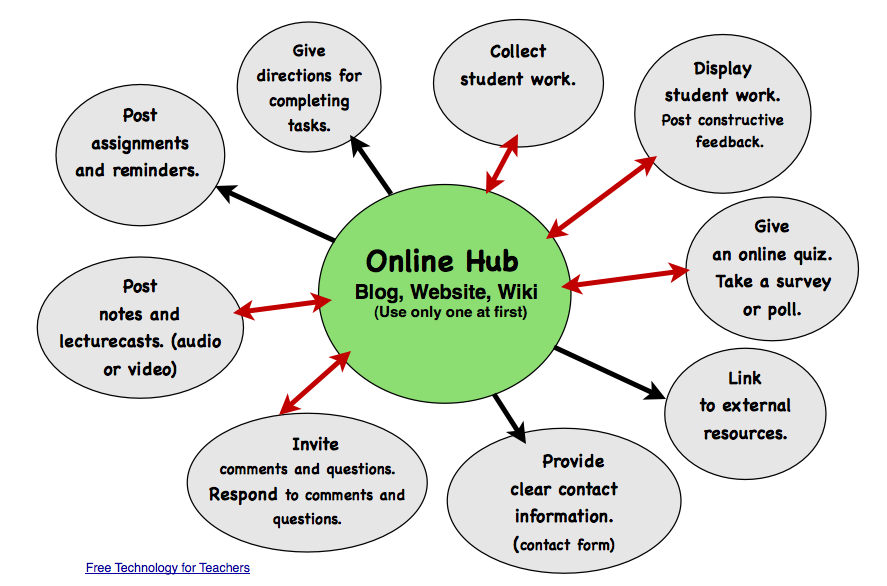
Benefits of Websites
Picture

Build Your Own Website in Weebly

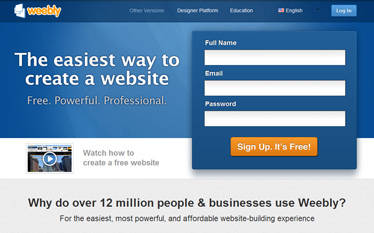
Weebly is  free online website creator uses a simple widget-based site builder that operates in the web browser. All the site elements are drag-and-drop and it automatically generates a mobile version of each website. It provides web-hosting and Storage is unlimited. The company is headquartered in San Francisco. 
​
  1. Access Weebly: www.weebly.com/
  2. Sign Up
  3. Enter a title for your website, the type of site and the category.
  4. Choose a website domain (use Subdomain; it's free).
  5. Play with your home page. Try dragging and dropping a basic element. 
  6. Note the tabs at the top of the page: BUILD, DESIGN, PAGES, STORE, SETTINGS. Look through the menus to see what options are available to you. Try changing the theme/design of your site.
  7. Click on the Pages tab. It is time to add a new page to your site. Drag and drop elements to your new page. 
  8. Publish your site. Click on the orange Publish button at the top right. A window will pop up letting you know that you published your site to the web successfully. To view your site as it is seen on the web, click on the web address. To go back to your site in 'edit' mode, click on the X.
  9. Add a link back to your school's home page.
  10. Email me ANY TIME if you have questions or need additional help.

Ideas are needed

  • Introduction of yourself/class 
  • Homework, homework help
  • Calendar
  • Current Events
  • Interactives
  • Contact for or email link back to you
  • Book list
  • Links to favorite or relevant sites
  • Lesson Plans
  • List of vocabulary or spelling words
  • Tips for success in class or on tests
  • Forms
  • Classroom blog
Picture
​Share Your Link
When your web page is ready, email your site link to your school website administrator and request they add it to your school website.
Picture
Powered by Create your own unique website with customizable templates.
  • Home
    • About me
    • PYP Research >
      • Information Literacy for PYP
      • Lesson Plans >
        • Grade 6
        • Grade 7
        • Grade 8
        • Grade 9
        • Grade 10
        • Grade 11
        • Grade 12
    • Personal Projects (MYP)
    • Extended Essay
  • About the Course
    • Syllabus
    • S.O.S for Information Literacy
    • Compare modules
    • Research Skills
    • Build Research
  • During the Course
    • 1st Week 6.1 Introduction >
      • Introduction n Expectations
      • Digital lIteracy: Web 2.0 >
        • Weebly
    • 2nd Week Information Literacy >
      • What is Information Literacy
      • Designing Research Question
    • 3rd Week Research >
      • Research Methodlogies
      • Research Modules
      • Big 6
    • 4th Week Big 6 >
      • Task Definition and Infrn. Seeking Behaviour
      • Location and Access, Use of Information
    • 5th Week BIG 6 and Methods of Evaluation >
      • Synthesis and Evaluation
      • Methods of Evaluation and Research Organizer
    • 6th Week Citations and Bibliography >
      • Citation Styles
      • Library Website
  • Note Taking
    • Cornell Note Taking
  • Evaluation
    • RADCAB
    • CARRDSS
    • CRAAP
  • Copyright
  • Research process
  • Resources
    • Research Helper
    • Research it
    • Research Guide
    • Skiils Guides
    • IL for K-12 Students
    • Developing Young Researcher
    • Big 6 Research projects
    • Digital lIteracy
    • Videos
  • Plagiarism not good
  • Citation styles
    • APA
    • MLA
  • Tutorials
  • News
  • Thesis Generator
  • Outline Maker
  • IL Activities
  • Shelving Game
  • Library Games
  • free Video tools
  • Untitled
  • References
  • Inquiry
  • New Page
  • Videos on Research
  • Grade 3